
Summary: This guide provides step-by-step instructions for retrieving the Tithely Giving Form embed code and integrating it into your Wix website using the Embed Code element, and offers the Direct Website Giving Link as an alternative if needed.
Before You Begin
- You must be logged into your Tithely account and the admin side of your Wix website.
- The embed code is required to display the giving form directly on your Wix page.
Step-by-Step Instructions
Retrieving Your Tithely Giving Form Embed Code
1. Log in to your Tithely account and select Giving.
2. Select Giving Form.
3. Select the correct organization from the drop-down in the top-left corner (if applicable).
4. Locate the "Embed Code" text block and Select the Copy button on the right side of the block.
Embedding the Tithely Form Code Into Wix
For the most up-to-date steps check out the Wix website directly at: https://support.wix.com/en/article/wix-editor-embedding-a-site-or-a-widget
1. Log into the admin side of your Wix website and open your Editor.
2. Click Add Elements.
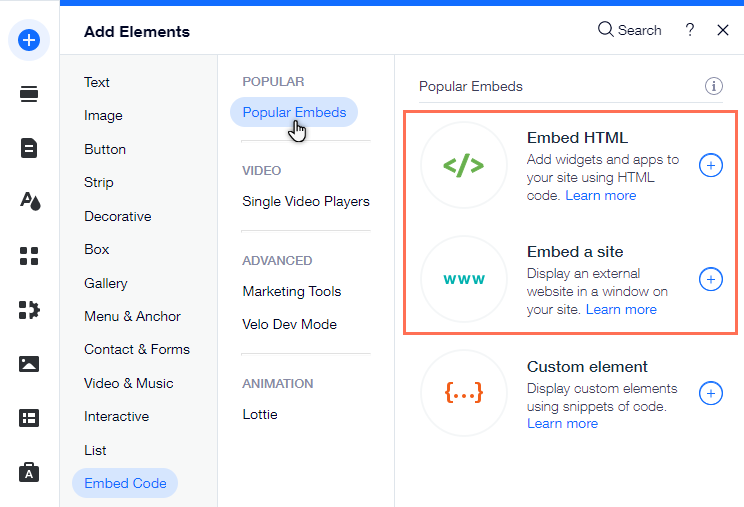
3. Click Embed Code.
4. Click Popular Embeds.
5. Choose Embed HTML to insert the code snippet.
6. Paste your embed code from Tithely into the section provided.
7. Save and Publish your Wix page.
Alternative: Using the Direct Website Giving Link

1. Log in to your Tithely account and select Giving Form.
2. Locate the Giving Form URL section.
3. Select the Copy Icon to copy your code to your clipboard.
4. Paste this link wherever you need it on your Wix site (e.g., behind a button, in a footer link, or on social media).
Troubleshooting & FAQs
- What is the best way to embed the code on Wix? The recommended method is to use the "Embed HTML" option within the Wix Editor, as this is designed for third-party code snippets (widgets).
- Where can I update the style of the form? While retrieving the embed code (Step 3), you can customize the styling of your Giving Form directly in the Giving Form Editor and save those changes.
- The embed is showing an error on Wix: Consult the Wix website directly for the most up-to-date steps on embedding custom code, or verify that your Wix site is using the Embed HTML option. If issues persist, use the Direct Website Giving Link instead.